Explanation of Lamp Indicators
Q
Please tell me the lamp indicators of a properly started Communication Box (insect trap camera).
When operating normally, the lamps will be in the following ON, blinking, or OFF states.
【For PIF-02】
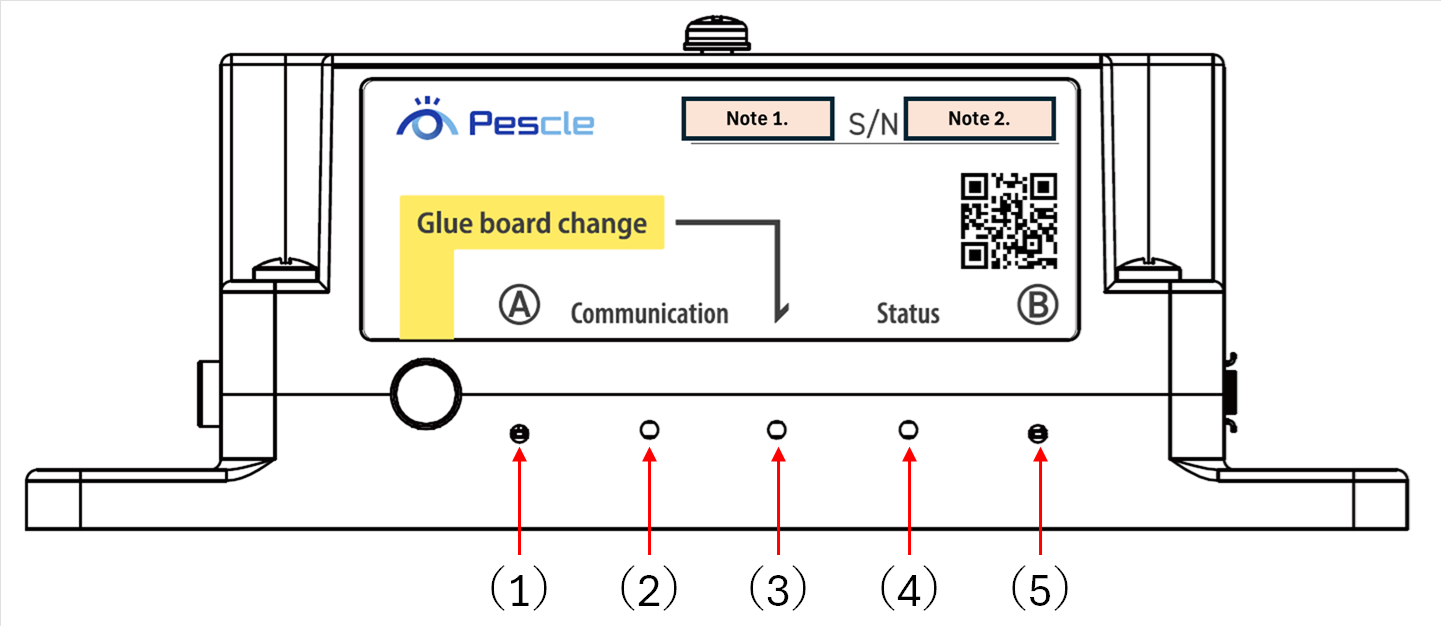
Note 1. Display the unit number
Note 2. Display the unit number
Figure No. |
Lamp Name |
Display after normal startup |
Description |
(1) |
A |
Blue: Blinking |
The LTE connection status of the Communication Box is normal. |
(2) |
Communication |
Blue: ON |
LTE connection is normal (if blinking, the signal strength is weak). |
(3) |
(Sheet Replacement) |
OFF |
Normal operation. |
(4) |
Status |
Green: ON |
The program status of the Communication Box is normal. |
(5) |
B |
Green: Blinking |
The program status of the Communication Box is normal. |
The conditions for each lamp being ON, blinking, or OFF are as follows.
If an abnormal lamp state occurs, please try restarting.
If the abnormal state continues, please contact us.
Figure No. |
Lamp Name |
Display after normal startup |
Description |
(1) |
A |
Blue: Blinking |
Indicates the LTE connection status of the Communication Box |
(2) |
Communication |
Blue: ON/Blinking |
Indicates the communication network status |
(3) |
(Sheet Replacement) |
OFF |
Indicates the sheet replacement status |
(4) |
Status |
Green: ON/Blinking |
Indicates the program status of the Communication Box |
(5) |
B |
Green: Blinking |
Indicates the program status of the Communication Box (power management/liveness monitoring) |
【For PIF-01】 (latest software version)
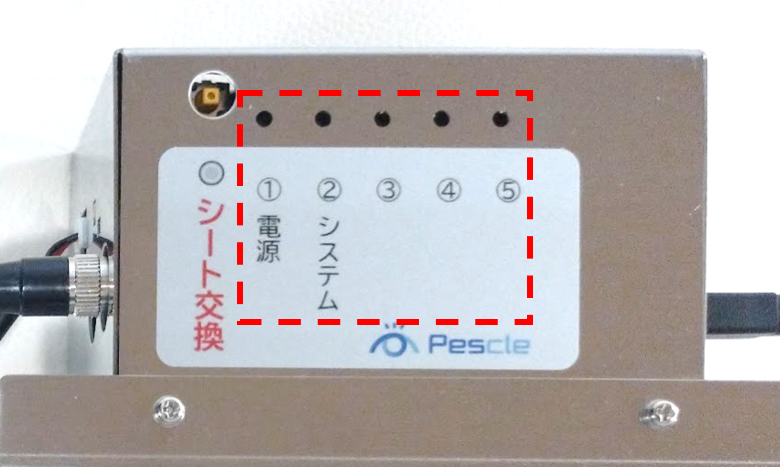
Lamp Name |
Display after normal startup |
Description |
(1) Power |
Red: ON |
Power supply is normal |
(2) System |
Green: Blinking |
The status of the Communication Box is normal |
(3) |
OFF |
LTE connection is normal (if blinking, the signal strength is weak). |
(4) |
OFF |
Normal operation (sheet replacement status indicator) |
(5) |
OFF |
The program status of the Communication Box is normal. |
The conditions for each lamp being ON, blinking, or OFF are as follows.
If an abnormal lamp state occurs, please try restarting.
If the abnormal state continues, please contact us.
Lamp Name |
Normal display |
Description |
(1) Power |
Red: ON |
Indicates the power supply status |
(2) System |
Green: Blinking |
Indicates the operation status of the Communication Box |
(3) |
OFF |
Indicates the communication network status |
(4) |
OFF |
Indicates the sheet replacement status |
(5) |
OFF |
Indicates the program status of the Communication Box |
【For PIF-01】 (old software version)
Lamp Name |
Display after normal startup |
Description |
(1) Power |
Red: ON |
Power supply is normal |
(2) System |
Green: Blinking |
The status of the Communication Box is normal |
(3) |
OFF |
Normal operation (camera operation status indicator) |
(4) |
OFF |
Normal operation (sheet replacement status indicator) |
(5) |
OFF |
Normal operation (photo data transmission status indicator) |
The conditions for each lamp being ON, blinking, or OFF are as follows.
If an abnormal lamp state occurs, please try restarting.
If the abnormal state continues, please contact us.
Lamp Name |
Normal display |
Description |
(1) Power |
Red: ON |
Indicates the power supply status |
(2) System |
Green: Blinking |
Indicates the operation status of the Communication Box |
(3) |
OFF |
Indicates the camera operation status |
(4) |
OFF |
Indicates the sheet replacement status |
(5) |
OFF |
Indicates the photo data transmission status |